Our offerings go well beyond our label printing services. As a consultative-custom-manufacturer, with a wealth of expertise on a variety of label-printing subjects, we are often called on to advise our clients about what might be their best choices when it comes to different formats of variable data, or bar codes. A common scenario is deciding between two types of two-dimensional (2D) barcodes, such as a QR Code and a Data Matrix Code.
In this post we take a deeper dive into both the similarities and differences between Data Matrix and QR codes. We will cover these particular codes' appearances, how to scan and print them, what applications each is best suited for and what could be the best choice for your business in the long-run.
What are 2D Barcodes?
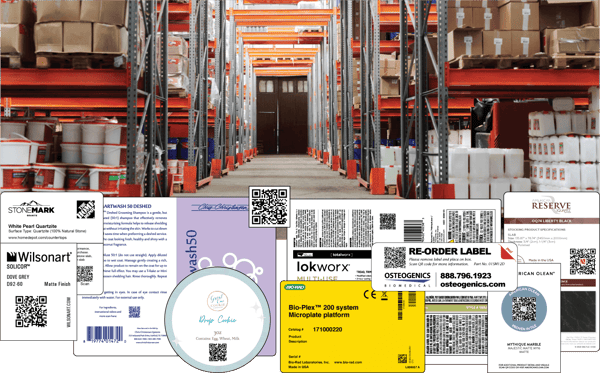
Both QR codes and Data Matrix codes are among a roster of Two Dimensional (2D) barcodes. Specifically these two types of codes are where the data is encoded in both horizontal and vertical directions, allowing for more information to be stored. This is particularly notable in comparison with a one-dimensional (1D) barcode UPC that only encodes a more limited amount of data and does so in one direction, from left to right. Also consider that these 2D codes are commonly used by manufacturers across a large number of industries and it is expected to expand with the likes of the GS1 Sunrise 2027 parameter this article will explain more farther below.
While both of these 2D barcodes are currently in the public domain and can be used royalty-free, Data Matrix codes have become the standard for a number of applications, including anti-counterfeit measures, parts identification, and internal tracking. They have grown to be a highly recommended choice because they feature multiple advanced versions of error-correcting codes that are more robust than those provided by QR codes. Thanks to the inclusion of Reed-Solomon error-correcting codes, the data remains readable in the case of a damaged or partially removed code.
Two researchers at the Massachusetts Institute of Technology Lincoln Library, Irving Reed and Gustave Solomon, are believed to have introduced the technology that led to two-dimensional barcodes in the 1960s. One early application was in the tactical ultra-high-frequency Department of Defense satellite system developed by Lincoln Laboratory. They were designed to rebuild missing data and to correct errors and signal corruption in satellite transmissions. In aerospace, the codes were used on the Lincoln Experimental Satellite (LES)-6, launched in 1968, and later in the NASA Voyager program in 1977. The first commercial application of Reed-Solomon codes in mass-produced consumer products was the compact disc (CD), adopted in the early 1980s.
ECC (Error Correcting Code) 200 is currently the most popular free Data Matrix Code generator. Further, GS1 DataMatrix (Data Matrix ECC 200) is the only Data Matrix configuration which employs Reed-Solomon error correction, a feature that allows the location of errors and, where possible, their correction.
Some additional 2D Codes include PDF417 for applications requiring the storage of huge amounts of data, such as photographs, fingerprints, and signatures; Aztec Code which is used by the transportation industry for tickets and airline boarding passes; and the UPS-developed MaxiCode for high-speed parcel sorting. All the while these three symbologies have not been selected for the Sunrise 2027 retail transition.
What Are QR Codes?
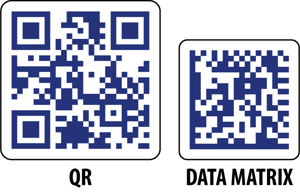
Invented by Denso Wave, a division of Denso Corporation, in Japan announced the release of the QR code in 1994. The "QR" in the name stands for "Quick Response." These codes were originally developed to track automobile parts during the assembly process, which one could assume response time is quite influential. A QR code is a 2D barcode featuring cells organized into square or rectangular shapes, in black and white or other contrasting dark and light colors. With sufficient contrast between the dark and light cells, QR codes can be printed in a wide variety of colors.

These data-encoding cells are arranged into a grid. Readable from any angle, they are referred to as "omnidirectional." QR Codes include a "finder pattern," of three identical squares on their top left, top right, and bottom left corners to help scanners identify the code. Due to their design, QR Codes use more room for the same amount of data, so with respect to saving space, they are of lesser quality when compared to Data Matrix Codes.
What Are The Best Applications for QR Codes?
QR Codes are best for customer-facing applications. They can provide pricing information, product expiration dates, serial numbers, and batch or lot numbers. QR codes can also offer URLs to connect the consumer to external websites with product usage instructions, recipes, or the outlets where these products can be purchased. Applied to packaging, QR codes can carry brand messaging, track and trace items, and combat the spread of counterfeit goods.
Consumers may see them on restaurant menus, print and digital advertisements, store displays, roadway signage, food packaging, business cards, airline tickets and many other items. The QR code is more ideal for a winder marketing end-user
Versatile and robust, these 2D barcodes — along with Data Matrix Codes — will replace the standard UPC barcode by 2027. The UPC code has been featured on consumer packaging for close to half a century. The newer QR and Data Matrix codes will be readable via point-of-sale scanners and offer access to supply chain transparency and offer brand management over a product's digital identity.

How Do You Scan QR Codes?
Particularly noteworthy is how most smartphones — iPhone and Android alike — are equipped with built-in features that will allow you to scan QR codes. Generally, no third-party app is required. This means that at the moment, QR Codes are more suited to customer-facing applications than Data Matrix codes, although this is changing.
On an iPhone or Android (Particularly Samsung):
 Open the phone's built-in Camera app and hold the phone so the QR Code appears in the viewfinder. The app should recognize the code and give a link notification (with black writing and a yellow background in some instances). Then tap the notification to open the link associated with the QR Code. If an Android device doesn't automatically allow this feature, a visit to the Settings section and enabling QR code scanning should resolve it.
 Additionally, on many Android phones — such as the Google Pixel and Motorola — Google Lens is built into the camera app and can also be used to scan QR Codes. When the Camera app is opened and a tap More > Google Lens allows for its use. Moving forward a Lens icon will be available to use whenever the camera is open, and it can scan QR codes.
 Another built-in feature that can help you scan QR codes is Samsung's virtual assistant, Bixby. To use it, launch your Camera app and tap Bixby Vision, then tap Allow to enable permissions, then enable all pop-up permissions. Scan the QR code, then tap Go to navigate to view the QR code content.
How Do You Print QR Codes?
Your code should be simple enough to scan and large enough to be seen; at least 0.8 X 0.8 inches on a small object, such as a business card. To test, find out what your ideal print size looks like, and then practice scanning first. On larger items, such as signage, make sure your code is well-placed and accessible.
Avoid broken links or outdated information in your codes. For the price of a subscription fee, you can purchase an editable Dynamic QR Code that will let you log into a dashboard to fix them without changing the appearance of the already printed codes.
Use quality images without blurred or pixelated QR Codes and print on material with even surfaces that do not reflect too much light, which might distort the image or make it harder to scan. Avoid placing multiple QR Codes too close together or right next to 1D barcodes to avoid scanning errors. Be sure to add an incentive of some type and/or a Call to Action (CTA) to help persuade consumers to scan your code.
Lastly, test for accuracy with a variety of scanning apps. You can also test by scanning your code with multiple devices with different operating systems (iOS, Android, Windows). And make sure to request a proof from your printer to test scan before printing a large volume of your QR Codes for distribution.
What are Data Matrix Codes?
U.S. company International Data Matrix, Inc., invented the Data Matrix Code in 1994. The Data Matrix Code is another type of two-dimensional code that encodes data in black and white or contrasting dark and light cells arranged in a grid. Unlike 1D barcodes, data matrix codes are omnidirectional, meaning they can be read from any angle.
 Like the QR Code, the Data Matrix Code also features a pattern to help camera scanners locate the code. In this case, it's an "L" shape on one side of the code, the "finder pattern," created by two solid adjacent borders, and two other borders made up of dark and light cells, called the "timing pattern."
The information encoded into a Data Matrix can be alphabetic or numeric and normally ranges from a few bytes of data up to 1556 bytes. The length of the encoded data depends on how many cells make up the matrix. As more information is stored in the code, the number of rows and columns increases. A Data Matrix Code can store up to 2,335 alphanumeric characters.
What Are the Best Applications for Data Matrix Codes?
Because Data Matrix codes can encode fifty characters in a symbol readable at 2 or 3 millimeters, and be read with only a 20% contrast ratio, they lend themselves to direct marking of very small items, such as tiny electronic components. However, they are scalable and can also be used to label much larger items. Up to this point they were best suited to be used in highly technical, industry-focused scenarios.
Over time, however, Data Matrix codes are becoming more versatile, and with the reliability afforded by their encoded error correction abilities, it is anticipated that they will increasingly replace QR Codes for numerous uses. Because while QR codes are more easily accessible for scanning on built-in smartphone apps right now, Data Matrix codes should have similar accessibility in the future.
Their primary applications are in warehousing, manufacturing, and retail, where they can be used to help track inventory volume and outgoing packages. In addition, they can also provide consumers with authentication information like product and SKU numbers to prove the product is genuine and not a counterfeit. Additionally the small size of the Data Matrix code is quite mighty where it could fit multiple parameters of a product such as the Global Trade Item Number (GTIN), expiration date, batch or lot number. While in contrast the larger QR code in size could only incorporate the product's GTIN.
In the aerospace industry, industrial ink-jet, dot-peen marking, laser marking or electrolytic chemical etching will permanently mark these components with Data Matrix codes. Once the components enter service, the codes can be read by a reader camera to decode the data for movement tracking or to check inventory stocks.
They are used routinely by the food industry in auto-coding systems to prevent incorrect packaging and dating of food products. The codes are maintained internally in a database by the manufacturer and associated with each unique product.
In addition, Data Matrix codes are well-suited to printed media, including labels and letters. They can be quickly scanned and read with a bar code reader, which allows them to be tracked, such as when a parcel has been sent to a recipient.
How Do You Scan Data Matrix Codes?
With the use of a Data Matrix Code scanner or an omnidirectional  camera scanner, the codes can be scanned from any angle, from 0 through 360 degrees. While you can scan Data Matrix Codes with some smartphone cameras, not all have that built-in capability and will require the use of a third-party app to read the information. Some of these apps include Scandit, Scanbot SDK, Code Scan. The GroupDocs DataMatrix Scanner work directly in a mobile browser with no app download required.
Who is GS1, and What is Sunrise 2027?
GS1 is a global and non-governmental organization with more than 2 million member companies in 120 countries. GS1 identifies itself as "a neutral, global collaboration platform" and in 2023, launched the Sunrise 2027 initiative. The GS1 Sunrise 2027 initiative was launched in response to an ever-growing need for better transparency, traceability, and authentication of products. The basic idea is to use single 2D barcodes such as Data Matrix and QR, instead of several 1D barcodes, such as UPC and EAN on product packaging, since 2Ds can contain more data. More than 50 years after the UPC's birth and the code hitting data limitations, QR code adoption abundance in the beginning of the COVID era and regulatory pressure all had roles in the demand for the initiative. While GS1's phased timeline included education, system upgrades, and pilot testing 2023–2025, which also incorporated pilots in 47 countries representing 88% of global GDP. Expectations are that by the end of 2027 retail point-of-sale systems must be able to read and process 2D barcodes alongside 1D UPCs. Coca-Cola, P&G, Nestlé, L'Oréal, Walmart, Kroger, and Woolworths are among those backing Sunrise. GS1 US — formerly Uniform Code Council, Inc. — is the most prominent national not-for-profit organization dedicated to the adoption and implementation of standards-based global supply-chain solutions. It is also prominent globally because the UPC barcode originated in the United States, and GS1 itself grew out of what was originally a US-based standards body.
 So What Does SixB Labels Recommend?
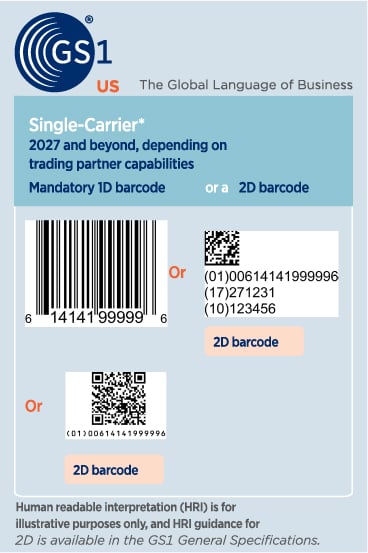
The accessibility of scanning QR codes through default camera apps in a multitude of devices make it prime for wider marketing campaigns targeting end users of a product. All the while, we believe the consumer market will likely lead to a path in the near future where the smaller and mighty Data Matrix code will too be widely scannable. The strength of a Data Matrix code is the large amounts of data it could contain, even more so than a QR Code, which in itself is still more than a UPC Code. So for example, in a scenario where the QR code contains the Global Trade Item Number (GTIN), the Data Matrix code contains the GTIN, plus the expiration date and the batch or lot number. This helps align with those goals for transparency, traceability and authentication of products more efficiently.
(The image at left depicts a 1D UPC code [top left]; 2D Data Matrix code [top right]; 2D QR code [bottom left].)
The team is happy to work with you and your business, providing a complimentary custom consultation while evaluating your business requirements, please contact us today!
Save Time - Email Us Directly With Your Questions on Barcodes and Barcode Equipment
See Related: